Building a Startup - Going from 0 to Senior Dev
This is the first post in a series where I will be sharing my journey from a dev with some experience to building out a full-scale SaaS business and becoming a (self proclaimed) “Senior Developer”. Please note I am not a senior developer but since it’s a solo operation, I am considering myself the most experienced developer, harshest critic, and biggest slacker in this company of 1.
I won’t be going too much into the business itself and more talk about my thoughts, opinions, and workflow when building out Avedii.
Origins
A little background on the actual project and why I started. Being in the fencing community for quite a while, I had attended a lot of tournaments, and eventually ended up volunteering to help run large scale tournaments. There, I was introduced to the gold standard of running fencing tournaments, Fencing Time Live. Fencing Time is an amazing piece of software and I really admire the team that built it; any of my critiques are purely from personal experience.
It felt a bit overkill for some of the things that we needed it to do, and it felt like it could do more things that it didn’t already do. The key aspects I wanted to address were:
- UI
- Architecture - Switch from desktop to web app
- Hosted Data - No need to keep your own fencer database
- Direct signups - No need to import or manually add fencers whenever you run a tournament
- Fencers are First Class Citizens - Enable fencers to track their own competitive history and notify them of changes
Another motivator for building this was at a club level. Fencing Time does require a certain amount of knowledge of the software to run a tournament, and again, was a bit overkill for just running a tournament of 32 people.
So I did what any nerd with computer skills would do, I started building my own.
Iteration 1
The first iteration of Avedii was actually built two and half years ago, using frontend frameworks focusing on client side logic. The current iteration is built using my “My Favourite Stack” (and I mentioned in that post my dislike of frontend frameworks).
The original project was built using SolidStart and PocketBase, and I had gotten a fair bit through before I got frustrated with the TypeScript and some oddities in SolidStart. Building the UI and logic at the same time in the same file was getting quite jarring, and having them so tightly coupled was something to get used to.
Here is a snippet from adding a Fencer to a tournament:
...

export default function AddFencer({ updateView, updateTable }: FormProps) {
	const location = useLocation();
	const [errors, setErrors] = createStore<FormErrors>({});
	const [fields, setFields] = createStore<FormData>({ country: "NA" });

	const validateName = (field: string, val: string) => {
		if (val.match(/(\d+)/)) {
			setErrors(field, "Numbers cannot be in name");
			return false;
		}
		setErrors(field, "");
		return true;
	};

	const validateWeapon = () => {
		if (!fields.foil && !fields.epee && !fields.sabre) {
			setErrors("weapon", "At least one weapon must be selected");
			return false;
		}
		setErrors("weapon", "");
		return true;
	};

	const submit = (e: SubmitEvent) => {
		let valid = true;
		e.preventDefault();
		if (!validateName("firstName", fields.firstName)) valid = false;
		if (!validateName("lastName", fields.lastName)) valid = false;
		if (!validateWeapon()) valid = false;

		if (!valid) {
			return;
		}

		let weapons: string[] = [
			fields.epee ? "epee" : "",
			fields.foil ? "foil" : "",
			fields.sabre ? "sabre" : "",
		];

		weapons = weapons.filter((v) => v != "");
		const tournamentId = getTournamentId(location.pathname);

		createFencer(fields.firstName, fields.lastName, weapons, tournamentId).then(
			(val) => {
				if (val) {
					updateTable((prev) => [...prev, val]);
					updateView(false);
				}
			}
		);
	};
	...
This was only for just collecting name, weapons, and country for a fencer. Now, looking back at this code having become a better developer, I see I could have used something like Zod for validating the fields before submitting.
But the issue was having this tightly coupled with the UI like this:
<label>
	<p>First Name</p>
	<input
		type="text"
		class="input-fields"
		onInput={(e) => setFields("firstName", e.currentTarget.value)}
		required
	/>
	<FormMessage message={() => errors.firstName} />
</label>
Now this isn’t so bad, since I’m already having to do this in my Django form templates, but having to declare an onInput handler for each type of input is annoying. The standard HTML and browser specs already handle these values.
File System Routing
Now I should say that the file system routing of SolidStart wasn’t the best documented at this time and is much better now, so my gripes are going to focus on how it was back then.
The file system routing was a nightmare. Trying to figure out how to route something like this /u/<tournament-id>/event/<event-id/settings was quite frustrating to understand. Especially if they had sibling routes for a similar route /u/<tournament-id>/fencers or /u/settings or even just /u/.
And then there was the nightmare of trying to understand API routes for when eventually I wanted to implement a mobile app.
Here is the directory tree after getting an understanding of routes worked:
├── [...404].tsx
├── api
│   └── event
│       └── poule.ts
├── index.tsx
├── login.tsx
├── user
│   ├── tournament
│   │   └── [tournament]
│   │       ├── event
│   │       │   ├── [event]
│   │       │   │   ├── fencers.tsx
│   │       │   │   ├── poules.tsx
│   │       │   │   ├── results.tsx
│   │       │   │   ├── seeding.tsx
│   │       │   │   └── tableau.tsx
│   │       │   └── new.tsx
│   │       ├── event.tsx
│   │       ├── fencers.tsx
│   │       └── (tournament).tsx
│   └── tournament.tsx
├── user(pages)
│   ├── calendar.tsx
│   ├── create.tsx
│   ├── tournaments.tsx
│   └── (user).tsx
└── user(pages).tsx
A lot of these files weren’t finished yet and were just created to see if I understood how it worked. It didn’t even contain the part where unauthenticated users viewing the app to check scores, or people trying to sign up for a tournament.
In my opinion, file system routing mainly works when you don’t have many nested routes with not many sibling routes.
Having now used Django’s apps and urls.py, I can’t imagine a different way of handling this.
from django.urls import path

from . import views

urlpatterns = [
    path("poule", views.PoulePrintHandler.as_view(), name="print-poule"),
    path("bouts", views.BoutHandler.as_view(), name="print-bouts"),
    path("tableau", views.TableauHandler.as_view(), name="print-tableau"),
]
Returning from sabbatical
After getting too frustrated with dealing with front-end frameworks and trying to wrap my head around the difference between running something client-side versus server-side and splitting the architecture between PocketBase and the UI. And then factoring the future need for a mobile app and using an API with that, I decided to put this on the back burner while focusing on university.
The last commit was December 6th 2024. No progress was made on this idea until, June 2025.
This is where I decided to change everything and switch stack. I had been playing around with Django, and found using it much more straight forward. Maybe there’s a reason why its “The web framework for perfectionists on a deadline”.
There is a clean separation of UI, logic, and database. Templates go in the templates directory, custom logic goes in the views.py, and database models in models.py. Then to make the UI and controller work better when dealing with client form requests we can start leveraging a forms.py and the django.forms package.
The initial project velocity was insane.

The auth out of the box was amazing, even though I had to replace the default username field with email. Hooking into the Permissions and Groups, made it easy to separate different pricing tiers, then combined with mixins and middleware logic it became trivial to implement authorisation.
Payment Integration
Integrating with a payment provider, Stripe, was fairly straightforward. I see why they’re the go to for payment handlers for software startups. To store data all I had to do was add the following in to my models for my profiles:
    stripe_customer_id = models.CharField(max_length=255, unique=True, null=True)

    billing_status = models.TextField(
        choices=SubscriptionStatus, default=SubscriptionStatus.INCOMPLETE
    )

    current_period_end = models.DateTimeField(null=False, blank=True)
    cancel_at_period_end = models.BooleanField(default=False)
Then I just created a webhook handler, among checkout session management, but opted to use the Stripe hosted flow, instead of an embedded flow.
This was probably the most challenging section, not from a development point-of-view (though it did take a while to wrap my head around all the concepts), but from a business decision point. Financial and payment handling should always be secure and making sure the way I am doing something is proper.
Marketplace vs Platform
This was another point that I implemented the quickest but spent the most time thinking about. One of the services this provided was direct tournament and event signups using payments. This is fairly straightforward right? Just create a form, store responses, accept a payment since I’m already using Stripe, and then add them to the tournament and event.
…Well it wasn’t as straightforward.
Building out the tournament form, not all events might want to be directly signed up into, for example, you might want to sort entries into a teams event on the day since you might move people across teams. So I needed to make some events optional to sign into. Storing responses wasn’t that big of challenge, just need to capture responses.
Accepting the payments was the main issue. Should I be the one collecting payments? How will this show up in my dashboard? Am I responsible for refund handling then? Will I have tons of products in my Stripe account?
When asking all these questions, I found my saving grace, Stripe Connect. Essentially, I could have people signup for Stripe Connect through my platform which essentially gave them their own Stripe account to accept payments. Brilliant. Not so fast. There are 2 ways to handle these connected accounts.
They can either be on a Marketplace, where essentially I collect payments and pay the organisers on my platform. This would mean I am in charge of Know-Your-Customer (KYC), refund handling, and fraud detection. But it would mean the onboarding is very quick.
Otherwise, it could be a Platform, where I connect (pun intended) the organisers with the responders where they pay the organisers directly, I can collect platform fees, the organisers have to handle refunds, and Stripe handles KYC and fraud detection. The only con was that the onboarding process is slightly longer.
SIGN ME UP
Some Pitfalls
One major issue I did find was when a UI required high interaction. Using this page as an example:
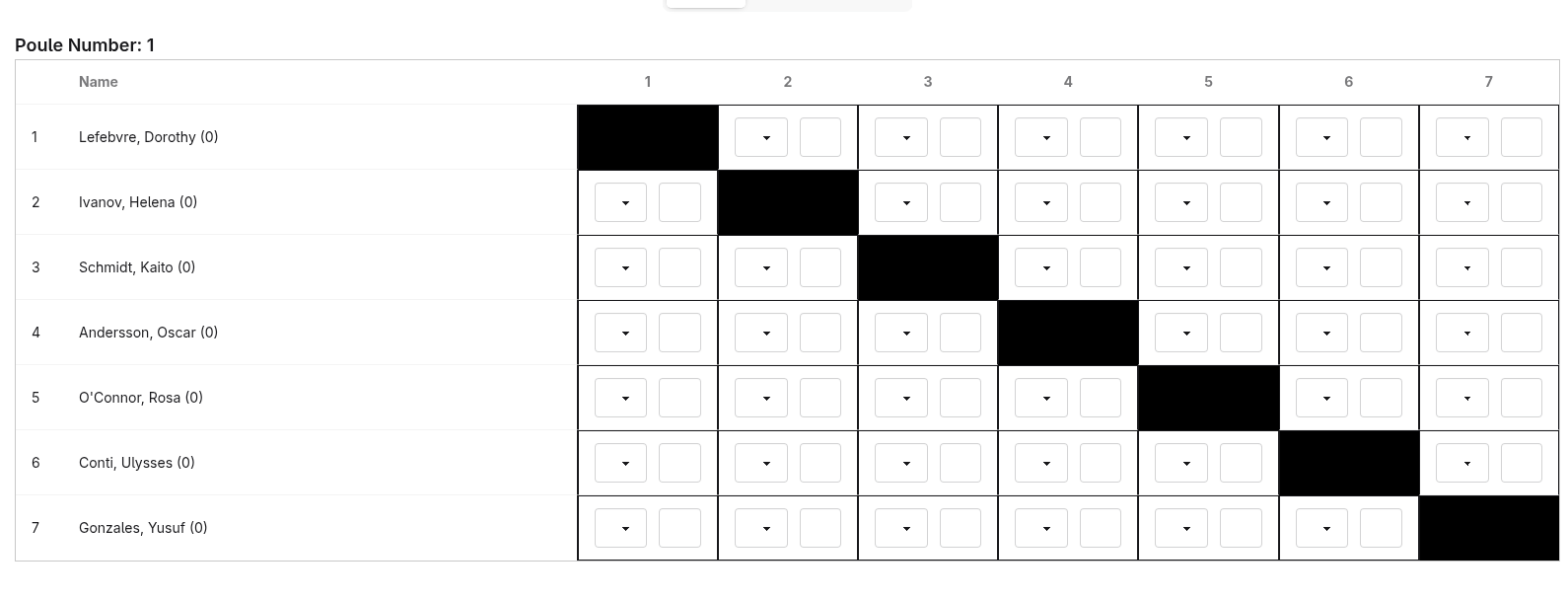
Each of the drop downs contain a single letter to depict whether the competitor won or lost (V or D), and the number box next to it is their score. Now to make this more UI friendly it should automatically determine the victor based on the scores, i.e. the greater score value, if however the score is the same, then wait for the user to update it and validate it.
This may be easier in a front-end framework, but using just vanilla JS combined with HTML attributes does make the markup a lot more messier.
<input
	type="number"
	name="{{ bout.id }}--{{ competitor.id }}"
	id="{{ bout.id }}--{{ competitor.id }}"
	class="pl-1.5 input border w-full bout-{{ bout.get_clean_id }}"
	min="0"
	max="45"
	onchange="scoreHandler(event, '{{ bout.get_clean_id }}')"
	x-user-changed="0"
	{% if competitor.id == bout.competitor_1.id and bout.competitor_1_score != -1 %}
		value="{{ bout.competitor_1_score }}"
	{% elif competitor.id == bout.competitor_2.id and bout.competitor_2_score != -1 %}
		value="{{ bout.competitor_2_score }}"
	{% else %}
		value=""
	{% endif %}
/>
This was just for HTML the corresponding Javascript file was exactly 100 lines.
Payments Dashboard
Another was the Stripe Connect embedded components. I could just redirect my users to their Stripe account, however that means that their leaving the platform and have another tab open, and that was the sort of friction I wanted to avoid.
I found that Stripe had a bunch of components that could be embedded through iFrames onto you site using some of their code. This seemed perfect, since it meant I could securely handle refunds and payouts.
But there was a significant issue with this. It took way too long to hydrate the page. Since it was being loaded and validated on the client side, it would have to make an outbound connection with Stripe services, create the component and send it back to their screen. This would take anywhere between 4-6 seconds on my network and it could vary from place to place.
I did employ some tricks to make it seem faster, by queuing the more important components first, then the less important. Also initially showing a loading skeleton, then once the Stripe connection has been made the more detailed Stripe skeleton would be shown. Finally once the components have been loaded it would show them. This way it always felt like it was loading correctly.
In the future I will have to implement my own dashboard for my users that loads faster and that will require a lot more background API calls to Stripe, but it will mean a better user experience. So anything to make the product the best.
Launching!!
Launching was nightmare. At least in my head. I felt like was behind on so many different features and that I hadn’t tested it enough, that I couldn’t sleep for days. This increased my paranoia, which in turn made more anxious about it all.
In reality, everything had been tested to oblivion, through unit tests, end-to-end tests, and by a few beta testers I had.
There were a few issues that had crept up hours before the launch that I quickly ran to solve test the hell out of, but for the most part everything went ok. There was a spike of viewers on the marketing site before and after the launch.
Fin
Overall the entire journey of r&d could only be described as an obsessive pursuit. I would spend hours into the night working on it, fall asleep for a couple hours, then wake up and do the whole thing again. Constantly messaging back and forth with beta testers for feedback, discovering issues, fixing them, then messaging them back to see what they thought.
It was honestly so much fun. I will write more about the story of the marketing site, the devops/infrastructure of the project, as well as how business development goes.
Thanks for reading, hope I didn’t bore you to much.
-P